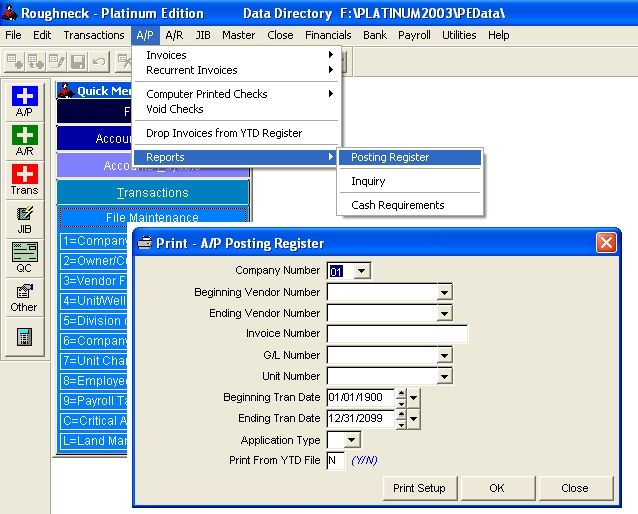
A/P Posting Register
This register prints from the temporary file APREG, which is normally cleared and moved to the YTDAPREG file when you close the period.
Select A/P - Reports - Posting Register.
Note: Beginning and Ending Tran dates refer to the Transaction Date, not the Invoice Date. The Transaction date is used for the above reports and for Operating Statements, Period Close & Reports, and Close the Year routines. By changing the default transaction date in the Utilities program or while entering the A/P Invoice you can enter transactions that you don't want printed on Operating Statements for a particular period.
The A/P Posting Register reads from the file APREG and prints all invoices and applications within the range of Dates you specified. Records in this file are normally cleared during Period Close for the specified range of Beginning and Ending Dates.
Click OK
On the Printer Setup screen: Check Print, which prints to paper, and Number of Copies equal to 1.
Click OK.
Check the Report:
The Period Total of this register should always equal the Period Totals in the Monthly Trial Balance report for GL Number 21000 - Accounts Payable. If the period totals do not agree, see FAQ - Period Close for info.
Related Topics
Roughneck Help System 02/15/07 10:30 am Copyright © 2006, Roughneck Systems Inc.